

Crystal Reports QR Code with Logo
Place a logo in the center of a QR Code using the Enhanced QR Code and image streaming.
The streaming method needs no fonts and no UFL. Related: Streaming Barcodes into SAP Crystal Reports (opens in a new tab) and the SaaS barcode generator (opens in a new tab).
Stream the symbol into the report
Open the example report in Crystal Reports 11 or later, preview, copy the QR Code Logo symbol and paste it into your own report.
- IDAutomation_CrystalReportsQRCodeLogoStreamingExample.rpt uses the free SaaS demo
- IDAutomation_Local_CrystalReportsQRCodeLogoStreamingExample.rpt uses the local streaming EXE
- The same feature is in the Linear + 2D Streaming Barcode Server for IIS
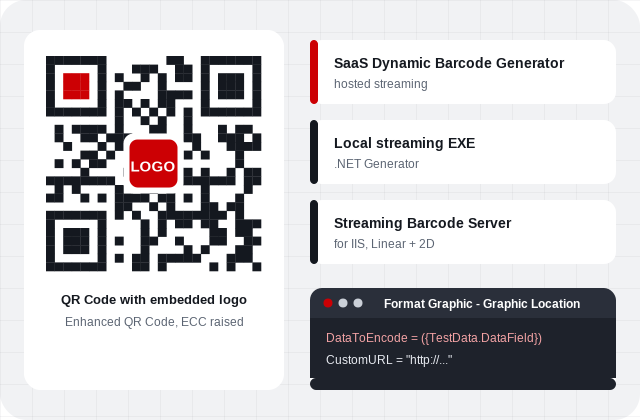
Add the symbol to your report
- In Preview, confirm the QR Code Logo symbol appears.
- Right-click the symbol, choose Copy, and paste it into your target report.
- Right-click the pasted symbol and choose Format Graphic.
- Choose Picture, then Graphic Location to open the Formula Workshop.
- Edit the DataToEncode, CustomParameters and CustomURL formulas as needed.
- Save and close the Formula Workshop, then return to Preview. If the symbols do not look right, use the example report to isolate the problem.
Formula guidance
If you see "A string is required", convert the value with cStr( {Table1.FloatValueField},0 ).
DataToEncode = ({TestData.DataField})
' add text or combine fields with &, ~d009 inserts a tab
' CustomParameters: separate with & and do not include spaces
' CustomURL: use http, not https
Frequently asked questions
Which Crystal Reports versions work?
Crystal Reports 11 and later.
How is the QR Code with a logo produced?
The implementation uses the Enhanced version of QR Code that streams images into the report, using the SaaS Dynamic Barcode Generator, a local streaming EXE from the .NET Generator, or the Linear + 2D Streaming Barcode Server for IIS.
Why does my image not load?
Crystal Reports cannot load images from HTTPS, so change https to http in the CustomURL.
What are the free demo limits?
The free SaaS demo adds an intermittent watermark and limits output to about 10 symbols per minute. Licensed versions have no such limits.
Should I raise the error correction?
Yes. The default of M may need to be increased when placing a logo or image overlay in the middle of the symbol.
Need a logo in your QR Code?
Read how Center Override and the Enhanced QR Code work.